Burndown and burn-up charts
A burndown chart plots the work still remaining against time: its slope shows how fast the team is finishing, and extending the line to zero gives a forecast [1]. A burn-up chart shows the same progress climbing, with total scope drawn as a separate line.
Use either for work delivered in short iterations and sized in points or hours. Neither fits a fixed-date release with open scope: both “assume you know how much total scope you have to burn down or burn up” [1].
1. Two burndowns answer two questions
The iteration (sprint) burndown is summed daily from the task board. The release burndown is updated once per sprint. Most misreadings come from mixing them up.
| Iteration burndown | Release burndown | |
|---|---|---|
| Unit | effort-hours or tasks | story points on backlog items |
| Cadence | daily | once per sprint |
| Who reads it | the development team | product owner, stakeholders, management |
| Question | will we finish this sprint’s commitment? | when will the release be done, and with what? |
The iteration burndown steers the team. The release burndown forecasts: its drop over a sprint is that sprint’s velocity, and its trend gives a date, best quoted as a range (see Velocity and flow).
2. Reading “actual above the ideal line”
The ideal line runs straight from the starting total to zero at the end. When the actual line sits above it, more work remains than the plan expected. The chart does not say why.
On a sprint burndown, a rise is often an estimate getting better. In Rubin’s example sprint, remaining work went from 180 to 190 effort-hours on day 3 because one task was re-estimated from 8 to 16 hours [1]. Nobody slowed down; the task board shows whether tasks grew or nothing finished.
On a release burndown, a flat line has two causes that draw the same picture: the team finished less, or scope was added as fast as the team finished it. They call for opposite responses. A slow team needs its impediment found. Growing scope is the product owner’s call, to cut scope or move the date; pushing or enlarging the team makes it worse.
3. The burn-up separates the causes
A burn-up chart draws work done and total scope as two lines. “Some people prefer to use the burnup format because it can easily show a change in scope for the release”: when scope is added, the target line moves up in the sprint where it arrived [1]. Slow work flattens the done line; added scope lifts the target.
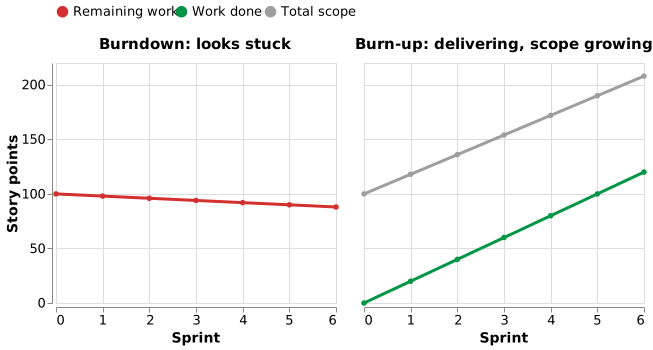 An illustration, not real data: a made-up team finishes 20 points a sprint while 18 are added. The burndown creeps from 100 to 88; the burn-up shows 120 points done against scope rising from 100 to 208.
A burndown can do the same if the line is stepped up where scope is added [2].
4. Example: a newspaper site that looked stuck
Slovenia’s largest publisher rebuilt its daily newspaper’s website in 2011, in nine three-week sprints with six to eight people. By sprint 7 the release burndown sat far above ideal. Yet the team had completed about 155 points in six sprints, while remaining work fell only from about 64 to about 52. The reason: “emerging requirements, which were not part of the initial Product Backlog, but were constantly added by the Product Owner during the project” [3].
Read alone, the chart said the team had done almost nothing; its velocity said it delivered steadily while scope more than doubled. The company used the burndown to simulate cuts and “successfully launched a reduced release after 9 Sprints”, against seven expected. When it did add two developers, in sprint 5, velocity fell to about 8 against 39 planned. Before you push the team, check whether the target moved.
5. What a burndown does not show
A burndown holds estimates of what remains and nothing else: “The sprint backlog and the sprint burndown charts always use estimated effort remaining. They do not capture actual effort expended” [1]. So it cannot show cost; a budget owner needs a different instrument (see Choosing a tracking instrument). Nor does it show value or quality.
How solid is this?
- Where it comes from. The definitions and constructed examples are from one practitioner textbook [1]; the only real project is the newspaper site, measured by its own coach.
- What is contested. Little about the mechanics. The newspaper figures are read off the paper’s charts to about two points, and “more than doubled” is our arithmetic, hence “about”.
- What we do not hold. No study shows that teams using burn-ups deliver better. The argument for the burn-up is that it shows something the burndown hides, not that it improves outcomes.
Acknowledgments
This page adapts material from lectures by Eduardo Miranda and David Root [4], [5] on software project management.
References
- K. S. Rubin,Essential Scrum: A Practical Guide to the Most Popular Agile Process. Addison-Wesley, 2012.
- A. Cabri and M. Griffiths,“Earned Value and Agile Reporting,” in Proceedings of AGILE 2006 (AGILE’06), IEEE, 2006, pp. 17–22. doi: 10.1109/AGILE.2006.21.
- V. Mahnič and N. Žabkar,“Measuring Progress of Scrum-based Software Projects,” Elektronika ir Elektrotechnika, vol. 18, no. 8, pp. 73–76, 2012, doi: 10.5755/j01.eee.18.8.2630.
- E. Miranda,“Managing Software Development.” 2014.
- D. Root,Managing Software Development. Carnegie Mellon University / Innopolis University lecture series, 2014.
Disclaimer: AI is used for text summarization, polishing and explaining. Authors have verified all facts and claims. In case of an error, feel free to file an issue.